Posts
Tempor est exercitation ad qui pariatur quis adipisicing aliquip nisi ea consequat ipsum occaecat. Nostrud consequat ullamco laboris fugiat esse esse adipisicing velit laborum ipsum incididunt ut enim. Dolor pariatur nulla quis fugiat dolore excepteur. Aliquip ad quis aliqua enim do consequat.
Nix Ollama with Zellij
A quick blog post on using nix with Ollama and Zellij.
In a previous post I demonstrated a quick Zellij environment setup using Nix.
Building on from that post, you can run your favourite command line tools. For example, if you want to run Ollama you will typically need multiple screens in your setup. Instead you can set up a configuration file for Zellij to handle the window layout. Doing this gives a simple setup command and saves you valuable time and effort.
Nix Zellij
A quick blog post on using nix with Zellij.
Where I can’t get my favourite Tmux configuration going, I often turn to Zellij. Zellij is a great alternative to Tmux and offers some cool elements, which I may revisit in a future blog post. For now, I just want to outline how to perform a similar layout configuration to the Tmux one I recently wrote.
You can amend the configuration used to setup the screen however you wish.
Just amend the dev.kdl script to realign your screen layout however you want.
Nix Tmux
A quick blog post on using nix with Tmux.
Tmux is one of my favourite tools. Recently I have been playing with Go Networking which often requires multiple terminals. Fortunately Tmux is great for this experience, but I often want to have a pre-defined setup.
Enter Nix and Tmux to manage the environment effortlessly.
You can amend the configuration used to setup the screen however you wish.
Just amend the dev.tmux script to realign your screen layout however you want.
Python Workout 2nd Ed
Review: Python Workout 2nd Edition

Python Workout 2nd Ed 2nd Edition. Python Workout, Second Edition: 200 ten-minute exercises by Reuven Lerner
My rating: 4 of 5 stars
Acing the CKA Exam 2nd Edition
Review: Acing the CKA Exam 2nd Edition

Acing CKA 2nd Ed 2nd Edition. Acing the Certified Kubernetes Administrator Exam by Chad Crowell
My rating: 5 of 5 stars
Nix Unattended
Tired of wrestling with complex dependencies and environment setups on your virtual machines? Or perhaps you’re constantly updating those Packer scripts? If so, this guide is for you! By combining Nix with unattended installation methods, you can save significant time and effort, making your VM provisioning process smoother and more consistent.
This approach is especially powerful when used with cloud platforms like Google Compute Engine (GCE), which offers incredible flexibility and scalability for your virtual machine needs. Imagine a marriage made in heaven: GCE’s raw power paired with Nix’s robust, reproducible environment management.
Nix and MacOS Sequoia
How to restore a Nix environment on MacOS 15 Sequoia.
In the blog post Getting started with Nix Package Manager we covered how to install Nix. A quick follow up on that post to discuss how to update a Mac post a system upgrade.
The upgrade will likely wipe out your Nix settings, so a reinstall is a quick way to get up and running. I dont persist installations using Nix, so I can always can wipe my installation. If you persist software using Nix, you will want to add an additional step to remove software prior to the system update.
Git Pre-Commit Hook
The following blog post illustrates how to use pre-commit hooks in a git workflow.
Pre-commit is a simple method for running abitrary commands prior to a Git commit. It allows automation of checks, such as code formatting, linting, security audits, and more, ensuring code quality and consistency. Hooks are typically scripts that pre-commit runs. A pre-commit hook, specifically, runs before each commit.
Catching issues early reduces debugging time and prevents broken code from entering the codebase. Use pre-commit hooks to enforce standards, improves collaboration, and maintains a cleaner repository history. Running a bash script via a pre-commit hook allows custom checks tailored to the specific project needs in a simple and reproducible manner.
Artifact Registry IAM
Artifact Registry is replacing Container Registry. If you want to access your Artifact Registry, there are couple of things to know. In this blog post, learn how to make a registry public or provide specific users with access.
To get started we will build a demo container and make this available for upload/download using Artifact Registry. This tutorial will guide you through the process of setting up a public Docker container registry using Google Cloud Artifact Registry. By making your registry public, anyone with internet access is allowed to pull your container images.
Nix Firebase
A quick blog post on using nix with Firebase.
Getting Firebase to work with Nix just requires a few package to get going 😂 If you have worked with Firebase, you know setting up the environment can be royal pain. Never fear, Nix can help with getting you ready to start developing locally.
Firebase provides a fantastic suite of tools for building modern web and mobile applications. Nix enhances this by providing a declarative and reproducible way to manage your deployment pipeline. Use Nix to define your Firebase project dependencies, configuration files, and deployment scripts, ensuring that your applications are always deployed in a consistent and reliable manner. This combination simplifies the process of managing complex Firebase projects and ensures that your applications are always deployed in a predictable and reproducible way.
Nix Golang
A quick blog post on using nix with Go.
Wait go isnt your jam 🤯, then swap out Go package with your favourite language 😂
Nix-Shell is my favourite part of Nix. Using Nix-Shell, you can temporarily install packages, but keep that new machine feel.
Go excels at building fast, efficient applications. Nix excels at managing complex dependencies and environments. When used together, they provide a robust and predictable development workflow. Nix allows you to create isolated Go environments, preventing version conflicts and simplifying dependency management. This ensures that your Go projects are always built and deployed in a consistent and reliable manner, regardless of the target platform.
Using Patch
Overview
While revising for some Kubernetes exams, I realised I havent done a blog post on some useful commands.
The third blog post covers the patch command.
For alot of situations patch can be a more straightforward approach to updating similar files.
If you are not familiar with patch, it takes the ouput from a diff and adds it to a file.
Typically you would use something like sed for a lot of in file manipulation.
Using diff
Overview
While revising for some Kubernetes exams, I realised I havent done a blog post on some useful commands.
The second blog post covers the diff command.
The diff command in Linux is a powerful utility used to compare files line
by line. It identifies the differences between two files and outputs these
changes in a format that can be used to patch one file to become identical to
the other. It is a fundamental tool for software development, system
administration, and document management where tracking changes is important.
Using heredoc
Overview
While revising for some Kubernetes exams, I realised I havent done a blog post on some useful commands.
The first blog post covers the heredoc command.
Heredoc (Here Document) is a way to pass multiple lines of input to a command. It allows you to redirect input from a string literal within your script, instead of from a file or standard input.
The basic syntax involves using << followed by a delimiter. Everything
following the << until the delimiter is encountered again on a line by
itself is treated as input to the command. Heredocs are useful for creating
multi-line strings, embedding configuration files within scripts, and
automating interactions with command-line tools.
Access Firebase site id
Introduction
A short blog post to outline how to access the site identifier associated with a Firebase project.
Access Site Identifier
-
Accessing a list of sites
To access a list of sites you can use the following command
NODE_TYPE // bashfirebase hosting:sites:list -
The above command also supports exporting the list as json
Host a static website
Introduction
The Hosting a static website blog post walks through the essentials of running a website from a Google Cloud Storage bucket.
In general just remember that the bucket name needs to be globally unique.
ProTip: prefix the bucket name with the Google project identifier e.g.
myawesomeproject-bucket
In this post, I show you how to add a landing page to a Google Cloud Storage bucket. If you just need a quick and easy website (e.g. not concerned about domains, SSL etc), this is a really simple option.
Git worktree
The following blog post illustrates how to use worktree in a git workflow.
A Git worktree allows you to check out multiple branches or commits at the same time. Each worktree is a separate working directory linked to the same repository. This is useful for working on multiple features concurrently, reviewing pull requests without stashing your changes, or experimenting without affecting your main working directory.
Once the worktree is declared, the typical cycle of Add, Commit, Push are then used to sync staging to a repository.
Nix Package Manager Housekeeping
How to clean up a Nix environment on (Debian Bookworm).
In the blog post Getting started with Nix Package Manager we covered how to install Nix. A quick follow up on that post to discuss how to clean up the environment.
The more you use Nix, the more relevant this post will be. So I separated out the details for the time you need to quickly remove the cache on your machine.
Google Cloud Professional Cloud Database Engineer Exam
Google Cloud Professional Cloud Datbase Engineer Certification (Mar 2024)
Disclaimer: Non official content, errors and omissions excepted
Pre Exam Notes
- Kryterion Sentinel software (Windows/Mac) installation requires administrator rights
- Kyterion system check - do this at least a day before to be on the safe side
- Identification taken using your phone
- No breaks during two hour exam
- Do the practice exam to build some confidence
- (Try and) get a good nights sleep before the exam
- The exam is multiple choice, so work out the wrong answers first!!
Post Exam Notes
- Online Kryterion exams still suck - Admin permissions for the entire machine, seriously?
- Confirmation of the exam result was one day (also came on a weekend)!!
- Swag stock is still limited, but better stock in general
- Swag is by geographic region (i.e. Europe, India, Everywhere else)
- In 2024 we finally get feedback, but only if you fail (Grrr!)
- 50 Questions
Google Cloud do not indicate the pass mark for the exam, but I would assume its somewhere greater than 70%.
Google Cloud Professional Workspace Administrator Exam
Google Cloud Professional Cloud Workspace Administrator Certification (Mar 2024)
Disclaimer: Non official content, errors and omissions excepted
Pre Exam Notes
- Kryterion Sentinel software (Windows/Mac) installation requires administrator rights
- Kyterion system check - do this at least a day before to be on the safe side
- Identification taken using your phone
- No breaks during two hour exam
- Do the practice exam to build some confidence
- (Try and) get a good nights sleep before the exam
- The exam is multiple choice, so work out the wrong answers first!!
Post Exam Notes
- Online Kryterion exams still suck - Admin permissions for the entire machine, seriously?
- Confirmation of the exam result was one day (also came on a weekend)!!
- Swag stock is still limited, but better stock in general
- Swag is by geographic region (i.e. Europe, India, Everywhere else)
- In 2024 we finally get feedback, but only if you fail (Grrr!)
- 50 Questions
Google Cloud do not indicate the pass mark for the exam, but I would assume its somewhere greater than 70%.
Getting started with Nix Package Manager
How to use Nix on (Debian Bookworm).
“Nix builds packages in isolation from each other. This ensures that they are reproducible and don’t have undeclared dependencies, so if a package works on one machine, it will also work on another.”
It may surprise you but Nix also has over 80K packages available.
Installation
The Nix site gives a clear overview of how to install, so refer to that to add it to your system. I use Nix on ChromeOS, Linux (Debian) and MacOS.
Node Firestore Import
A quick aide memoir on how to import data from a CSV formatted files into Firestore. If you have used the Pet Theory lab, this should be familar, but if not here is the code.
The general idea is to create a csv and import it directly into Cloud Firestore. To do this, the code will read the csv, then connect to Firestore and add a new collection containing the csv records.
Node Fake Data
A quick guide on generating test data. If you have used the Pet Theory lab, this should be familar, but if not here is the code.
The general idea is to create a csv based on made up dataset. To do this, use the Fakerjs package and write the output as csv records.
If you have not worked with Fakerjs before, this is a nice short cut to get to grips with the Firestore API.
Plan to succeed with certifications in 2024
2024 Aspirational Certifications
Overview
So currently I have a number of Certifications that will need to be renewed in 2023. Rather than procrastinate about which to take I actually put some thought into this time around.
Check out the main article over on Medium Link
What certifications do you plan to take in 2024 and why?
Remote JSON with Dart
JSON (JavaScript Object Notation) is a lightweight data-interchange format
that is widely used for transmitting data between a server and a web
application (or mobile app). In Flutter (and Dart), handling JSON involves
encoding Dart objects into JSON strings (serialization) and decoding JSON
strings into Dart objects (deserialization). Flutter provides built-in
libraries like dart:convert to facilitate these operations. Understanding
how to effectively handle JSON is crucial for building Flutter apps that
interact with APIs or need to store/retrieve structured data. The process
generally includes fetching JSON data from a network resource (like an API
endpoint), parsing the JSON data into Dart objects (often custom classes),
manipulating that data within your app, and optionally converting Dart objects
back to JSON for sending data to a server.
CSV delimiter and JOIN
Convert Complex CSV with custom delimiter.
jq is like sed for JSON data - you can use it to slice and filter and map and transform structured data with the same ease that sed, awk, grep and friends let you play with text.
In a previous post I covered the task of converting JSON to CSV.
- Reference: Convert CSV to JSON.
If you have a situation where the data contains commas, then the following post might be of some use.
I will assume you are starting from a Spreadsheet (I am using Google Sheets JOIN, but if you are using Excel use the TextJoin command).
Google Cloud Professional Cloud Network Engineer Exam
Google Cloud Professional Cloud Network Engineer Certification (November 2023)
Overview of the exam covered in this medium article
Best of luck!
Local JSON with Dart
Using Dart to process JSON can seem a complicated choice at first. There are a couple of things to be aware of when processing JSON. To build our understanding I will be taking a manual approach to hand crank through a JSON file. Obviously you shouldnt do this in the real world, but this is meant to be an educational post :-) In the following blog post I assume you already have the Flutter environment setup. If you dont have an environment handy you can use dartpad.dev or similar to practice.
Convert CSV to JSON with JQ
Convert CSV to JSON with JQ.
jq is like sed for JSON data - you can use it to slice and filter and map and transform structured data with the same ease that sed, awk, grep and friends let you play with text.
In a previous post I covered the task of converting JSON to CSV.
- Reference: Convert JSON to CSV.
Recently I realised that I never covered the opposite transaction i.e. CSV to JSON. So here is the missing piece to that puzzle. If you are working with data systems transformation can be a major hassle. I highly recommend using an existing tooling where appropriate. Taking the well worn path can make life much easier.
Merge multiple JSON files with JQ
Merging JSON files with JQ.
jq is like sed for JSON data - you can use it to slice and filter and map and transform structured data with the same ease that sed, awk, grep and friends let you play with text.
If you have multiple JSON files that you want to combine, it can be tempting
to write a program to perform this task.
However, did you know that our old friend jq can do this without too much
hassle.
Google Cloud Professional Cloud Security Engineer Exam
Google Cloud Professional Cloud Security Engineer Certification (Oct 2023)
Disclaimer: Non official content, errors and omissions excepted
Pre Exam Notes
- Kryterion Sentinel software (Windows/Mac) installation requires administrator rights
- Kyterion system check - do this at least a day before to be on the safe side
- No breaks during two hour exam
- Do the practice exam to build some confidence
- (Try and) get a good nights sleep before the exam
- The exam is multiple choice, so work out the wrong answers first!!
Post Exam Notes
- Online Kryterion exams still suck - Admin permissions for the entire machine, seriously?
- Waiting for confirmation of the exam result is now 10 days!!
- Swag stock limitations
- Still no feedback beyond pass/fail (Grrr!)
- 45 Questions
Google Cloud do not indicate the pass mark for the exam, but I would assume its somewhere greater than 70%.
Imagemagick Fuzz Transparent
A quick tutorial on using Imagemagick to remove a background colour from images. The image file format needs to support transparency e.g. PNG.
NOTE: JPG doesnt support transparency, so it would be necessary to convert the file.
There is also this method Imagemagick transparency I find the option below to be a bit more flexible.
Remove background color
- Set the input file
input="old-white.png"- Set the output file
output="new-image.png"- Set the background color to remove
background_color="white"- Set the background to transparent and remove the colour white
convert $input -fuzz 5% -transparent $background_color $output In the above example the input image has a white background. Amend the percentage as required.
Google Cloud Storage CORS
Introduction
When working with Google Cloud Storage as a backend, you will probably need to amend the CORS setting at some point. CORS stands for Cross Origin Resource Sharing and is invoked from your browser as a security access feature. Typically the HTTP-header will indicate which origin is permitted to be accessed. If you want to work with the web and specifically image files, adding a CORS setting will save you time.
Google Cloud Storage Metadata
Introduction
If you are using a Google Cloud Storage bucket for application development you may want to use this handy tip. When working with data, you can turn off the cache-control option. If you want to test things like temporary JSON or image files, this setting is super useful.
Amend the bucket metadata
Google Cloud Storage provides a number of metadata key/value pairs. One useful setting is the Cache-Control. The default option is to have cache enabled. If you plan to use temporary data, it might be advisable to amend the setting as follows:
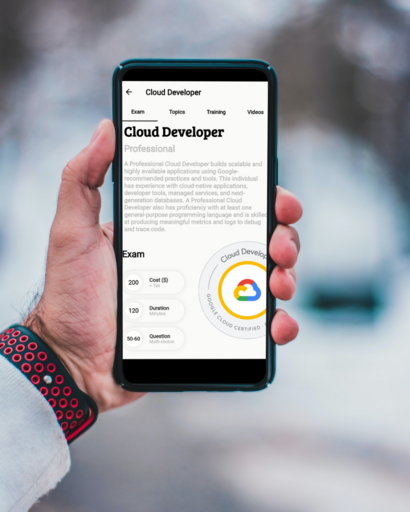
Google Cloud Professional Cloud Developer 2023
Google Cloud Professional Cloud Developer Certification (Feb 2023)
An overview of taking the Google Cloud Professional Cloud Developer Exam.
Blog Post
Rich Rose Professional Cloud Developer Feb 2023
Training Material
The material I used to get ready for the exam.
| Source | Type | Description | Rating |
|---|---|---|---|
| Google Cloud Docs | Docs | Very detailed | 4/5 |
| Google Cloud Platform | YouTube | Treasure trove of informative sessions - very helpful | 4/5 |
| Awesome GCP Certification | Links | Good list of materials and sources | 4/5 |
Best of luck!
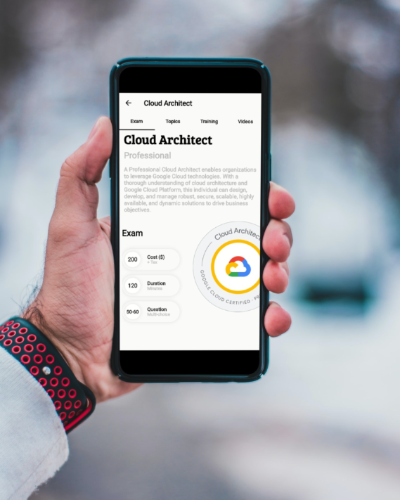
Google Cloud Professional Cloud Architect 2023
Professional Cloud Architect Certification (Feb 2023)
An overview of taking the Google Cloud Professional Cloud Architect Exam.
Blog Post
Rich Rose Professional Cloud Architect Exam Feb 2023
Training Material
| Source | Type | Description | Rating |
|---|---|---|---|
| ACloudGuru formally Linux Academy | Course | Exam specific content, good practice questions | 4/5 |
| Coursera | Course | Cloud Architecture with Google Cloud | 3/5 |
| Pluralsight | Course | Cloud Architecture with Google Cloud | 3/5 |
| Create and Manage Cloud Resources | Hands On Labs | Good hands on content for architect exam | 4/5 |
| Set up and configure a cloud environment in Google Cloud | Hands On Labs | Good content | 4/5 |
| Deploy and manage cloud environment with Google Cloud | Hands On Labs | Good content | 4/5 |
| Google Cloud Docs | Docs | Very detailed | 4/5 |
| Google Cloud Platform | YouTube | Next sessions - very helpful | 4/5 |
| Official Professional Cloud Architect | Book | Very detailed overview of exam syllabus | 4/5 |
| Professional Cloud Architect | Book | Very detailed overview of exam syllabus | 4/5 |
| Awesome GCP Certification | Links | Good list of materials and sources | 4/5 |
Best of luck!
Flutter and Dart Cookbook
Overview
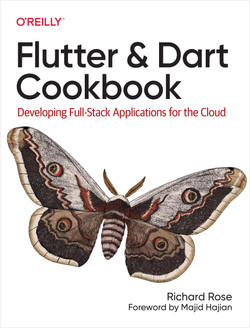
The cookbook shows you how to:
- Write effective Dart code by using variables and data structures
- Build applications with Flutter by exploring widgets and data handling
- Understand cloud provider solutions and learn how to integrate them with Flutter
- Manage data through APIs using Google Cloud Serverless
- Work with Firebase solutions such as Authentication and the Cloud Firestore database
- Build web applications that also work with mobile and desktop platforms
Book Information
- Author: Rich Rose
- Publication Date: 2023
- Publisher: Oreilly
- Repo Link: Flutter and Dart Cookbook
Google Cloud Professional Data Engineer 2023
Google Cloud Professional Data Engineer Certification (Jan 2023)
An overview of taking the Google Cloud Professional Data Engineer Exam.
Blog Post
Rich Rose Professional Cloud Data Engineer Jan 2023

Training Material
The material I used to get ready for the exam.
| Source | Type | Description | Rating |
|---|---|---|---|
| ACloudGuru | Course | Exam specific content, good practice questions | 4/5 |
| Coursera | Course | Data Engineering, Big Data and Machine Learning | 3/5 |
| Pluralsight | Course | Data Engineering, Big Data and Machine Learning | 3/5 |
| Perform Foundational Data, ML and AI tasks in Google Cloud | Hands On Labs | Good content | 4/5 |
| Engineer Data in Google Cloud | Hands On Labs | Good content | 3.5/5 |
| Google Cloud Docs | Docs | Very detailed | 4/5 |
| Google Cloud Platform | YouTube | Treasure trove of informative sessions - very helpful | 4/5 |
| Professional Data Engineer | Book | Very detailed overview of exam syllabus | 4/5 |
| Awesome GCP Certification | Links | Good list of materials and sources | 4/5 |
Best of luck!
Plan to succeed with certifications in 2023
2023 Aspirational Certifications
Overview
So currently I have a number of Certifications that will need to be renewed in 2023. Rather than procrastinate about which to take I actually put some thought into this time around.
In the new year, I will begin the preparation for my 2023 year of study. I typically take four cloud based certifications a year. On top of that I also take numerous other courses, but that is for another discussion. So the question is which certs should I take? The internet has a strong opinion on which will be most beneficial, however the answer is not so simple.
Google Cloud Professional Cloud Security Engineer
Google Cloud Professional Cloud Security Engineer Certification
Overview
If you work with Google Cloud then you really should be looking at taking the Google Cloud Professional Cloud Security Engineer certification. You will join an exclusive group of fellow professionals.
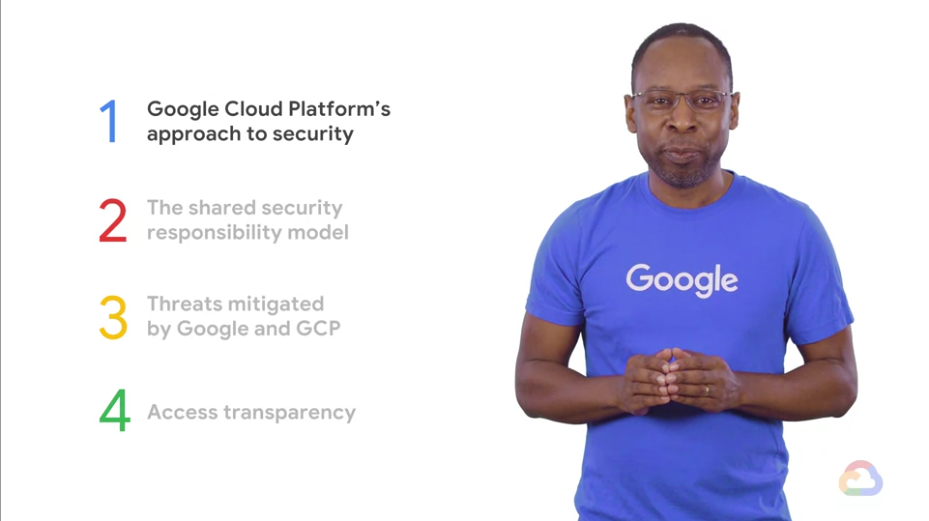
The exciting part is you will learn a valuable skill set and you would have begun the immensely rewarding journey to invest in your future self.
Warning the exam is not meant to be comprehensive, so understand that the exam is just a measuring tool.
Answering the multiple choice questions in the exam doesn’t make you an expert.
It does offer some validation that you have learned a common base of knowledge.
Pdftk merge
“PDFtk - The PDF Toolkit. PDFtk is a simple tool for doing everyday things with PDF documents. It comes in three flavors: PDFtk Free, PDFtk Pro, and our original command-line tool PDFtk Server.”
In a prior blog post, the PDFTK utility was installed.
Working with PDF can often produce multiple files that would be easier to manage if they were combined. Learn how to use the utility to merge mutliple files into a PDF.
Tmux and Cloudshell
Tmux is a terminal multiplexer, which is a fancy way of saying it give you the ability to run multi terminals. Google Cloud Cloudshell uses the default Tmux configuration which makes me not want to use it.

However help is at hand. You can update the settings and this post covers how
to make those changes.
Cloudshell is meant to be a lite developer environment so I will only add
some essential productivity changes.
Webm to Gif ChromeOS
ChromeOS Screenshot
ChromeOS added a cool feature to allow videos as well as images to be taken from the desktop.

The cool part of this feature is you can choose which part of the screen to snapshot. If you are a blogger, this makes you life much simpler and is a welcome addition. The output by default is Webm, however in this blog post I demonstrate how to convert to gif.
Install Xpra
Overview
Xpra is an open-source multi-platform persistent remote display server and client for forwarding applications and desktop screens.
The Xpra homepage provides the following overview:
It gives you remote access to individual applications or full desktops. On X11, it is also known as screen for X11: it allows you to run programs, usually on a remote host, direct their display to your local machine, and then to disconnect from these programs and reconnect from the same or another machine, without losing any state. It can also be used to forward full desktops, from X11 servers, MS Windows, or Mac OS X.
Cloud Run Regex
Cloud Run Regex
Normally when someone mentions regex its time to make a swift exit. Since I was working on a new project featuring Cloud Run I needed to face my fears. This is my story.
Regex for the masses
Cloud Run has a defined url signature which is common across all deployments. If you need to check that this signature is valid, regex is a nice approach to perform this action.
Terminal in ChromeOS
ChromeOS Terminal
The default terminal in ChromeOs was making some of my applications look less than their best. For example Pass is one of the main applications that I use on a regular basis. When using this software the border that was meant to be shown as lines is actually displaying garbage characters.

The above image merges the smooth lines with the horrible replacement characters. Seeing this on a daily basis was causing me stress!!
Codeceptjs Initialisation
Introduction
Recently I have been tasked with the job of testing lots of web based applications. Historically this has been a manual effort, so to begin the new year I looked at how this might be automated. Having looked at a number of options, I remembered a really cool piece of technology I used for web-scraping.
Codeceptjs is very handy automation tool for web browsers. It includes helpers for WebDriver, Puppeteer and Playwright. The following is a quick intro to get you going.
Cobra Command Line using Go
The Go programming language is an open source project to make programmers more productive. In the following blog post I assume you already have the Go environment setup. Previously we have created a Hello World application. The next step is to create a command line application. The example below covers the basics of using Cobra
Go Installation
- Confirm Go is installed
go versionIf it is not installed check out a previous post to install Go in Linux
Google Cloud Professional Cloud Network Engineer Exam
Google Cloud Professional Cloud Network Engineer Certification (September 2021)
Disclaimer: Non official content, errors and omissions excepted
Pre Exam Notes
- Kryterion Sentinel software (Windows/Mac) installation requires administrator rights
- Kyterion system check - do this at least a day before to be on the safe side
- No breaks during two hour exam
- Do the practice exam to build some confidence
- (Try and) get a good nights sleep before the exam
- The exam is multiple choice, so work out the wrong answers first!!
Post Exam Notes
- Online Kryterion exams still suck - Admin permissions for the entire machine, seriously?
- Waiting for confirmation of the exam result is now 10 days!!
- Swag continues to be “Out of stock”
- Still no feedback beyond pass/fail (Grrr!)
- 50 Questions
Google Cloud do not indicate the pass mark for the exam, but I would assume its somewhere greater than 70%.
Setting up ChromeOS Minikube
Recently while playing with some development tools, I was surprised to see Minikube now runs on ChromeOS. Minikube allows for a scaled down Kubernetes cluster running directly on your host machine. Kubernetes is a container orchestrator. Put simply it enables the “simplified” running of containers. In this blog post learn how to set up ChromeOS to run minikube using KVM without Developer Mode.
Enhancing Cloudshell on Google Cloud
Cloud Shell is super useful and features a lot of tools. However out of the box the general setup doesnt match my local machine. If you want to use tmux or vim in your environment, this blog post is for you. The following is a quick summary of changes made to update Cloud Shell to be a bit more like my own machine.
Software Stack
My default software stack is based on the following applications
Fish on Cloudshell
Fish is described as a smart and user-friendly command shell. As you would expect it works on Linux and is super useful to get that optimized experience. The blog post covers installation on GCP Cloud Shell I would expect the installation process to be similar on any Linux based machine.
If you want to use oh-my-bash, read a previous post on using Cloud Shell with oh-my-bash
NGINX reverse proxy
An Nginx reverse proxy enables client requests to be forwarded on to a backend server. In this scenario the backend server provides responses to the client. A setup like this can be useful in a number of situations where Nginx is used to control the processing. It is also a nice security setup as the Nginx acts as a gateway and only passes traffic based on appropriate content on to the backend server.
oh-my-bash on Cloudshell
If you work at the command line with Git this ones for you! Most of my time is spent at the Linux command line. My tool of choice is always “oh-my-bash” as it just works across all my machines. However if you are using a Cloud Provider environment, you probably dont want to spend time setting up another environmment.
Installation
- Open Cloud Shell
- Install the
oh-my-bashpackage
sh -c "$(curl -fsSL https://raw.githubusercontent.com/ohmybash/oh-my-bash/master/tools/install.sh)"If you are interested in a more exotic configuration, read a previous post on installing oh-my-bash
Setting up ChromeOS Virtual Machine
ChromeOS can create multiple virtual machines to run various software. Creating a new virtual machine allows for software to be tested without ruining your existing setup. It is also great for running programs in an isolated fashion. In this blog post learn how to Create a new virtual machine in ChromeOS.
Introduction
- Create a virtual machine
- Create a Ubuntu container
- Create a user account
- Setup SSH
Create a virtual machine
- In a browser press
CTRL+ALT+Tto open the Chrome OS developer shell (i.e. chrome-untrusted://crosh) - Create a new VM
vmc start sandbox- Create a new profile A profile enable the default settings to be altered.
lxc profile copy default custom-profile- Update the profile setting
lxc profile set minikube-profile security.nesting true
lxc profile set minikube-profile security.priviledged false
Create a Ubuntu container
LXC supports a number of images in the following section Ubuntu is used. To see a list of available images:
AppSheet Apps
Recently a colleague created a spreadsheet but was unaware of the power lurking underneath. Google Sheets include a very comprehensive toolset that can be used to extend functionality.
Overview
In this blog post learn how to access a Google Sheets document to extend functionality. To get started there are a couple of things to know.
- You dont need to know how to program to extend Google Sheets
- Spreadsheets have security built into them, so you need to be an authorised user to access them
For the purposes of this blog, the following actions are required:
Google Cloud Professional Cloud Security Engineer Exam
Google Cloud Professional Cloud Security Engineer Certification (June 2021)
Disclaimer: Non official content, errors and omissions excepted
Pre Exam Notes
- Kryterion Sentinel software (Windows/Mac) installation requires administrator rights
- Kyterion system check - do this at least a day before to be on the safe side
- No breaks during two hour exam
- Do the practice exam to build some confidence
- (Try and) get a good nights sleep before the exam
- The exam is multiple choice, so work out the wrong answers first!!
Post Exam Notes
- Online Kryterion exams still suck - Admin permissions for the entire machine, seriously?
- Waiting for confirmation of the exam result is now 10 days!!
- Swag continues to be “Out of stock”
- Still no feedback beyond pass/fail (Grrr!)
- 50 Questions
Google Cloud do not indicate the pass mark for the exam, but I would assume its somewhere greater than 70%.
Node Rest API
A REST API is super useful and can present a simple way to efficiently access information. This blog post is dedicated to the folks who want to create an API. It seems like a lot of folks are in this boat by the amount of comments over on sites like Reddit. Lets get started by building a GET/POST API in Node.js.
Requirements:
- Node.js installation
- Linux based environment
- Internet access
- GitHub (Optional) - code is stored there if you get stuck
Overview
In this blog post learn how to make a local REST API that response to both GET and POST requests. The following content can also be applied to a serverless environment. If you need to learn how to apply this to Google Cloud, I highly recommend reading Chapter 8 of my book Hands-On Serverless with Google Cloud.
A Free Virtual machine
Introduction
Did you know the lovely providers of cloud have a free tier? Have you wanted to take advantage but not sure where to start?
If you are not familiar with the Free Tier offerings it can be worth your time to take a look. Below are the main cloud providers you may have heard of:
Overview
In this blog post learn how to create a virtual machine on Google Cloud. Once the machine is created add a simple application and run it from your free virtual machine. For the purposes of demonstration I will stick with the Free Tier. Feel free to update the machine specification to your own requirement once you are comfortable with the build process.
Setting up Brunch ChromeOS
Introduction
At present there a few methods to run ChromeOS on a device. If you have a Chromebook or Chromebox, the experience will be based on the official ChromeOS image provided by Google. For those without access to this type of device, there are other options. In this blog post learn how to use Brunch as one of those options.
NOTE: Brunch is an unofficial product, so use with caution.
Why ChromeOS?
Why ChromeOS may offer more than you thought?
ChromeOS is one of the worst best-kept secrets in technology. Google describes ChromeOS as a speedy, simple and secure operating system.
ChromeOS focuses on simplicity, think using a browser - but full supported by a full blown operating system.
It also includes features that are more compelling than tech reviewers would have you believe.
If you have ever watched a technology reviewer scoff at a ChromeOS device featuring high-end specs. Unsure whether ChromeOS is a good fit for your requirements. Or have been told that ChromeOS cannot do any “real” work. This article is for you.
Git rename branch
The following blog post covers how to rename the default branch in GitHub. If you have wondered how to do this task it is basically two discrete steps.
-
- Rename the default branch
-
- Update the local clone
Once complete the branch will be available and response as the default.
Rename Default branch
The default branch configuration can be changed from the GitHub interface. From the GitHub interface select the repo to update
Install X2Go
Overview
x2Go enables you to access a remote machine over SSH. The wiki entry provides the following overview:
“X2Go enables you to access a graphical desktop of a computer over a low bandwidth (or high bandwidth) connection. X2Go is a Remote Desktop solution, which some vendors vaguely call Remote Control. This is not to be confused with Microsoft Remote Desktop Connection, which is a competing Remote Desktop solution and protocol. With X2Go, you mainly access Linux computers. The Linux computer you are accessing is the X2Go Server. (There are ways to connect to a Windows computer as well; some of them are only available with the Linux X2Go Client.)”
Web Cors Proxy
Introduction
Cross-Origin Resource sharing (CORS) is a server setting that can be quite annoying.
In general CORS is a great idea as it provides enhanced security by specifying which ORIGIN is valid.
If you are a developer that controls the front and backend of an application, good news. Review the following Stackoverflow article on Cross-origin resource sharing.
However, if you are the frontend developer, unfortunately a fix may be in the hands of others to resolve. As I have come across this issue a number of times recently, I wanted to outline how to bypass this issue.
Imagemagick Transparent
A quick tutorial on using Imagemagick to remove a background colour from images. The image file format needs to support transparency e.g. PNG.
NOTE: JPG doesnt support transparency, so it would be necessary to convert the file.
Remove background color
- Set the input file
input="old-white.png"- Set the output file
output="new-image.png"- Set the background color to remove
background_color="white"- Set the background to transparent and remove the colour white
convert $input -transparent $background_color $output In the above the input image has a white background.
Use Imagemagick to remove the white from the input image.
The resulting image is written to the output file.
Imagemagick Shadow
A quick tutorial on using Imagemagick to add a background shadow to images. For the best result, ensure the original image has a transparent background. It is also useful to observe consistent sizes for the images.
Add a shadow
- Set the name of the input image - for example
input="old.png"- Set the name of the output image - for example
output="new.png"- Use the input image and create the output image with a shadow
convert -page +4+4 $input -alpha set \( +clone -background navy -shadow 60x8+8+8 \) +swap -background none -mosaic $output Imagemagick Resize
A quick tutorial on using Imagemagick to resize images. Imagemagick provides a couple of options that are worth considering.
- Resize with constraints (i.e. maintain the aspect ratio)
- Resize without constraints
Intelligent Resize
- Resize an image and adhere to the aspect ratio of the original image
convert old.png -resize 700x700 new.pngSimple Resize
In this example explicitly set the size of the image to 700x700.
Install Node
Node.js Installation
The Node.js programming language is an open source project to make programmers more productive.
Node.js is flexible and easy to learn. Its wide adoption is primarily down to the universal nature of the language. If you have a web browsers such as Google Chrome, it comes with a very rudamentary development environment as part of dev tools. The web is already available everywhere, so why not learn the language of the web? JavaScript is very quick to learn. If you want to move beyond that to topics such as Node.js, and Express, JavaScript is an ideal language. In most cases, having this language in your arsenal will be very useful to build quite powerful applications.
Hugo site automation with Cloud Build
Introduction
In this post I collate the blog posts on building static sites with Hugo and Cloud Build for easier reference. At the beginning of the process, I wanted to experiment with using Hugo. As time progressed I found it to be an awesome piece of software. In addition I also wanted to utilise Cloud Build to automate the very manual process of blog deployment.
Cloud Storage
- Create a (multi-region) Cloud Storage Bucket
- Add permissions for website to the bucket
Blog Creation
- Create a static site using Hugo.
- Add the static site to source version control e.g. GitHub
- Reference: Blogging with Hugo.
Cloud Build
- Create a Hugo image
- Link Cloud Build to the static site under source version control
- Create a
cloudbuild.yamlconfiguration for Cloud Build - Add the yaml configuration to the source control
- Create a Cloud Build trigger to reference the cloudbuild.yaml
- Reference: Building an image with Cloud Build.
- Reference: Deploying a Hugo Blog with Cloud Build.
Blogging
- Add Blog entries to source version control
- Site will automatically deploy based on the Cloud Build trigger configuration
References
It may be helpful to read the prior blog posts on Hugo, Containers and automation on Google Cloud:
Convert JSON to CSV with JQ
Convert JSON to CSV with JQ.
jq is like sed for JSON data - you can use it to slice and filter and map and transform structured data with the same ease that sed, awk, grep and friends let you play with text.
Being able to move between different file format is quite a common task, so I was delighted to find a quick and easy method for JSON/CSV.
In the following blog post learn how to use jq to transform JSON data into the CSV format.
Once the data is in CSV format, it should be a simple matter to import into other applications (e.g. databases, spreadsheets, etc).
Getting started with Pack + Buildpacks
How to use Buildpacks on ChromeOS (Debian Buster).
“A buildpack is something you’ve probably leveraged without knowing, as they’re currently being used in many cloud platforms. A buildpack’s job is to gather everything your app needs to build and run, and it often does this job quickly and quietly. That said, while buildpacks are often a behind-the-scenes detail, they are at the heart of transforming your source code into a runnable app image.”
Google Cloud Professional Cloud Architect
Google Cloud Professional Cloud Architect Certification (Jan 2021)
Disclaimer: Non official content, errors and omissions excepted
Exam Knowledge Areas
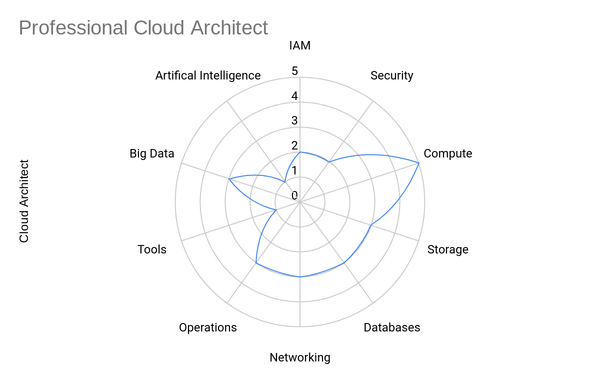
Pre Exam Notes
- Kryterion Sentinel software (Windows/Mac) installation requires administrator rights
- Kyterion system check - do this at least a day before to be on the safe side
- No breaks during two hour exam
- Do the practice exam to build some confidence
- (Try and) get a good nights sleep before the exam
- The exam is multiple choice, so work out the wrong answers first!!
Post Exam Notes
- Pretty comprehensive overview of Google Cloud.
- Exam is much clearer than the one taken a couple of years ago.
- Case Study questions were at the end of the exam - hopefully this is the same for everyone?
- Still no feedback beyond pass/fail (Grrr!)
- 50 Questions
Google Cloud do not indicate the pass mark for the exam, but I would assume its somewhere greater than 70%.
Setting up a Custom Domain on GCP
Introduction
If you want to host a static site e.g. blog or website, there are plenty of great options available. One option is to host your content in a storage bucket. Another option is to use Firebase hosting. Recently I watched a couple of YouTube videos that walk through the process of setting up a site.
- Hosting a static web app on Google Cloud using GCS
- Using Google Cloud Storage + Cloudflare to Host a Static Website for just PENNIES PER MONTH!
Using a Custom Domain with Google Cloud and Cloudflare
Inspired by the above videos, I decided to give it a try and migrate my very old Wordpress blog to Google Cloud.
Google Cloud Professional Data Engineer
Google Cloud Professional Data Engineer Certification (Jan 2021)
Disclaimer: Non official content, errors and omissions excepted
Exam Knowledge Areas
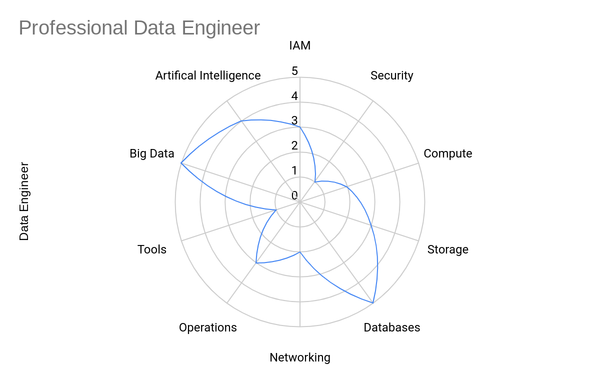
Pre Exam Notes
- Kryterion Sentinel software (Windows/Mac) installation requires administrator rights
- Kyterion system check - do this at least a day before to be on the safe side
- No breaks during two hour exam
- Do the practice exam to build some confidence
- (Try and) get a good nights sleep before the exam
- The exam is multiple choice, so work out the wrong answers first!!
Post Exam Notes
- Pretty comprehensive overview of using data on Google Cloud.
- Lots of questions on handling data - generally quite thought provoking
- Some complexity in the questions, but most written to be clear
- Still no feedback beyond pass/fail
- 50 Questions
- A couple of stinker permission questions - ProTip, read the question backwards
General list of topics that are potentially covered based on the exam criteria:
Deploying a Hugo Blog with Cloud Build
Introduction
Build, test, and deploy on the Google Cloud serverless CI/CD platform. Cloud Build scales up and scales down in response to load with no need to pre-provision servers or pay in advance for additional capacity. Pay only for what you use.
In this blog post, Cloud Build is used for the automation of Hugo builds. The Hugo automation works in isolation so this technique can be repeated for pretty much any deployment. Therefore, while I use Hugo in the example, feel free to substitute any binary as part of the workflow.
Pdftk Installation
“PDFtk - The PDF Toolkit. PDFtk is a simple tool for doing everyday things with PDF documents. It comes in three flavors: PDFtk Free, PDFtk Pro, and our original command-line tool PDFtk Server.”
In this blog post learn how to install PDFTK used to edit PDF.
- Install PDFTK on debian
sudo apt install pdftk- Create a directory for the conversion to take place e.g. $HOME/temp/convert
mkdir -p ~/temp/convertUse a conversion folder to store pdf input/output content.
Pdftk watermark removal
“PDFtk - The PDF Toolkit. PDFtk is a simple tool for doing everyday things with PDF documents. It comes in three flavors: PDFtk Free, PDFtk Pro, and our original command-line tool PDFtk Server.”
In a prior blog post, the PDFTK utility was installed. Now use the utility to remove a watermark from a PDF.
- Get the PDF with a watermark and copy it to the directory created e.g.
cp watermark.pdf ~/temp/convert- Move to the convert directory
cd ~/temp/convert- Uncompress the PDF
pdftk watermark.pdf output uncompress.pdf uncompress- Use the SED utility to remove the watermark text e.g. replace WATERMARKTEXT with the text in your PDF. Ensure the text used is exactly that same as that identified in the PDF.
sed -e "s/WATERMARKTEXT/ /" uncompress.pdf > sanwatermark.pdf-
Open the new sanwatermark.pdf file with a PDF reader and confirm the watermark has been removed.
Setting up tmux
Introduction
Tmux is a terminal multiplexer. It lets you switch easily between several programs in one terminal, detach them (they keep running in the background) and reattach them to a different terminal. If you work at the command line, manage multiple machines or work in the Cloud you will definitely want to investigate using a terminal multiplexer. I have found Tmux to be incredibly useful for a wide variety of usecases e.g. Kubernetes, SSH sessions and general development.
Build a container image with Cloud Build
Introduction
If you want to build a container image there are lots of options available. Docker, Buildpacks and Cloud Build provides a very convienient way to manage builds. In this blog post, we will use Cloud Build to create an image based on a configuration.
Google Cloud Project
Definitely check out Free Tier to try Google Cloud products. Cloud Build is included in the free tier. To use Cloud Build ensure:
- The Cloud Build API (i.e.
cloudbuild.googleapis.com) is enabled
Cloud Build 101
Cloud Build is a serverless automation tool available on Google Cloud. Its purpose is to remove the toil associated with building software. To do this, Cloud Build uses containers to define custom workflows for build, test and deploy stages. In addition it works seamlessly with the Google Cloud products and also plays nicely with source control solutions such as GitHub.
Blogging with Hugo
Introduction
Blogging is a really good way to make notes on the things you have learned over the years. Previously I used Wordpress to capture my notes but I found it quite cumbersome.
More recently I became aware of Hugo and decided to give it a try (spoilers this site is the result).
Hugo is a really amazing piece of software that enables you to generate a static site.
A static site is perfect for a blog, and quickly getting up and running with a local site can be done in a matter of minutes.
Creating a Static website in Google Cloud Storage
Introduction
The Hosting a static website blog post walks through the essentials of running a website from a Google Cloud Storage bucket.
In general just remember that the bucket name needs to be globally unique.
ProTip: prefix the bucket name with the Google project identifier e.g.
myawesomeproject-bucket
In this post, I show you how to add a landing page to a Google Cloud Storage bucket. If you just need a quick and easy website (e.g. not concerned about domains, SSL etc), this is a really simple option.
Setting up a landing page
Introduction
A landing page is just a simple webpage that typically has a background image and some information. Here are some examples to get you started.
Lets use the free template https://onepagelove.com/download/me as an example page to get up and running.
Working with the example Landing Page
As you might expect the most of the work has been done for you. A live preview shows what the template looks like. If you do not like what you see, keep searching the templates. If you do like what you see …
Hello World in Go
The Go programming language is an open source project to make programmers more productive. In the following blog post I assume you already have the Go environment setup. To get started with Go is just a matter of adding some code. The example below covers a basic “Hello World”.
Go Installation
- Confirm Go is installed
go versionIf it is not installed check out a previous post to install Go in Linux
Compiling Vim
“Vim is a highly configurable text editor built to make creating and changing any kind of text very efficient. It is included as “vi” with most UNIX systems and with Apple OS X.”
This tutorial covers the steps required to compile Vim from source with Python support (i.e. python3.x). If you use ChromeOS or a Linux distribution, it may not necessarily have access to the latest build of the application. To get past this issue, compiling from source provides the best approach. Learn how to build Vim, so understand how to enable example packages needed for plugins based on Python.
Install Go
The Go programming language is an open source project to make programmers more productive. Go is expressive, concise, clean, and efficient. Its concurrency mechanisms make it easy to write programs that get the most out of multicore and networked machines, while its novel type system enables flexible and modular program construction. Go compiles quickly to machine code yet has the convenience of garbage collection and the power of run-time reflection. It’s a fast, statically typed, compiled language that feels like a dynamically typed, interpreted language.
Install Oh my bash
Oh My Bash is a delightful community-driven framework for managing your bash configuration, and an auto-update tool so that makes it easy to keep up with the latest updates from the community.
At the end of this blog post, your command line should look similar to the image below:
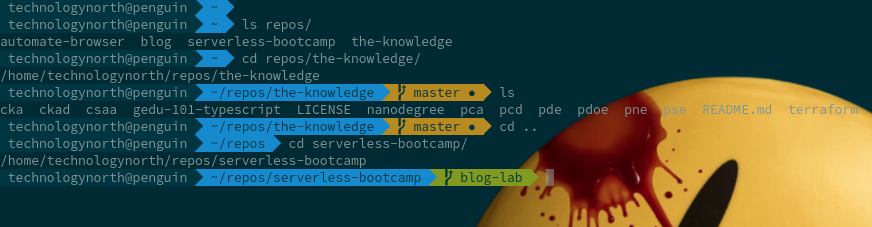
In the image:
- Blue: indicates a non
gitbased directory/subdirectory - Green: indicates a
gitbased directory in sync with the remote - Orange: indicates a
gitbased directory with changes to be applied
Bash Configuration
- Configure Zsh/Bash shell with user based themes to make the command line visually appealing.
Install system fonts
-
Fonts can be downloaded from here - follow example below to install them on host (install.sh)
Setting up Vim
“Vim is a highly configurable text editor built to make creating and changing any kind of text very efficient. It is included as “vi” with most UNIX systems and with Apple OS X.”
This tutorial covers the steps required to setup Vim (including Python 3.x support).
Installation Guide
There are lots of really excellent tutorials on setting up Vim for the first time. Personally I dont use most of the features, so have been steadily reducing the number of plugins I use.
RPi Kubernetes
RPI Kubernetes
A quick overview of how to build a Raspberry Pi Cluster using Linux.
Bill of materials
- Raspberry Pi (Minimum x 2) - recommend RPi v4
- MicroSDHC Card (Minimum capacity 8GB)
- USB Charging Cable (Same number as RPi devices)
- Machine to create an RPi Disk Image
Which disk image?
The 64bit Ubuntu image is currently my preferred choice as it just works! Raspberry Buster image comes in multiple flavors.
RPi Base Image
RPI Create Image
Debian installation on RPI
A quick overview of how to build a image.
Bill of materials
- Raspberry Pi x 1
- MicroSDHC Card (Minimum 8GB)
- USB Charging Cable (Same amount as RPi)
- Machine to creating a RPi Disk Image
Create the Disk Image
- Download a Raspberry PI image e.g. Raspbian Debian Image
- Take the Memory Card and install an operating system.
-
Download either torrent or the zip file to your machine Note: the location where the file is being downloaded
Project 3: Udacity Racer
Module 3: Asynchronous Programming in JavaScript
The last module in the Nanodegree introduces asynchronous programming in JavaScript.
Project Link: UdaciRacer Repo
- Pros: Interesting project, good example of starter asynchronous code
- Cons: Very short project
Asynchronous Programming with JavaScript
The modules in this section of the Nanodegree cover the following topics:
- Introduction to Asynchronous Programming
- Synchronous Concepts and Asynchronous Callbacks
- Sequence Events - Promises
- Sequence Events - Async/Await
- Project: UdaciRacer Simulator
In the final project of the course, you create a motor racing game. The project udacity racer is a short programming task as already written for you.
Project 2: Mars Rover
Module 2: Functional Programming
The second project involves working with APIs to access Nasa Mars Rover data.
Project Link: Mars Rover Repo
- Pros: Very enjoyable and educational project
- Cons: Content is long and I didn’t really feel engaged until I started working on the project.
Functional Programming
Learn Functional programming
- Course Introduction: Functional Programming
- Introduction to Functional Programming
- Functional JavaScript Syntax
- Functional Programming in JavaScript
- Going Further with Functional JavaScript
- Project: Mars Dashboard
In this second module you learn Functional programming. Again, there is a lot of course material. The training content isnt very interactive, and there is a lot to go through. However, the material is a decent overview of Functional programming and also provides some good links to continue researching into the subject matter.
Certified Kubernetes Administrator (CKA) Exam
Certified Kubernetes administrator (sep 2020)
disclaimer: non official content, errors and omissions excepted
Tldr;
- 2 hours in duration
- 20 questions
- Kubernetes revision is v1.19
- Pass mark is 66%
- Cost is $300 dollars and includes one free retake
- CNCF Exam guide - Five domains covered in the exam
Things to know
Pre Exam Notes
- Chrome based extension monitors exam machine - Works on any machine supporting Chrome!!
- Require a decent camera to take an image of identification
- Do the system check a couple of day before the exam
- No breaks during two hour exam
- (Try and) get a good nights sleep before the exam
- The exam is based on hands on lab exercises!
- Highly recommend you know how to use Vim
- Highly recommend you know some Linux commands
- Buy an exam voucher on Black Friday, valid for a year
Post Exam Notes
- Pretty comprehensive overview of Kubernetes v1.19.
- Exam requires you to understand Kubernetes concepts
- The 2 hours will go really fast - practice speed as well as accuracy
- Can request feedback on exam result - Well done CNCF!!
- Exam results sent after 48 hours
Exam Preparation
I used the Certified Kubernetes Administrator (CKA) with practice tests on Udemy by Mumshad Mannambeth. Actually I got both the CKA and CKAD as I plan to do both exams at a bargain price of £11.99 each. Meanwhile I read the excellent Kubernetes in Action by Marko Luksa. It’s a really well written book and covers more than enough to get you through the exam material. Finally I used my collection of Raspberry Pis to make two 3 node clusters - one for installation configuration and the other for workloads. I was also going to do the LA course as I already have a subscription but ended up not using that.
Serverless Days 2020
The following blog post shows the presentation made for the Serverless Days 2020 in Warsaw.
Sorry, your browser doesn't support embedded videos.
In the presentation given, I speak about using Google Cloud to perform serverless tasks with a local application. The demonstration includes an application that calls a backend Cloud Function. Specifically I am using Googleapis for translation of text entered by the application user.
Project 1: Dinosaurs
Module 1: Object Orientated JavaScript
The first project involves building an infographic based on Dinosaurs.
Project Link: Dinosaurs Infographic Repo
- Pros: Enjoyable project, nice development project
- Cons: Training content is quite dull and the quizzes lacked quality control
Object Oriented JavaScript
The modules in this section of the Nanodegree cover the following topics:
- Objects in Depth
- Functions at Runtime
- Classes and Objects
- Object-Oriented Design Patterns
- Project: Dinosaurs
In the first module you learn the basics of JavaScript and how to build a simple application. The project demonstrates how to work with the Document Object Model using JavaScript. In the exercises the base code is provided and you are required to update it. In the module end project you are asked to dynamically build the infographic by updating the DOM.
Intermediate Javascript Developer (Nanodegree)
Learn Intermediate JavaScript
The goal of the Intermediate JavaScript Nanodegree program is to prepare students for roles in web development, server-side application development, and desktop development that require a more advanced set of JavaScript skills. This program will also prepare students with the skills required to use JavaScript frameworks like React, Angular, and Vue.
Pre Course
- Estimated Duration: 3 months
- 3 Modules
- 3 Projects
Post Course
The projects are definitely the best part of this Nanodegree. Project submissions are usually marked really quickly within 24 hours. The project reviewers will try to be helpful with their comments. However if you have to resubmit, your next reviewer may be more particular about your submission.
Certified Kubernetes Administrator (CKA)
Certified Kubernetes Administrator (CKA)
Overview
Instructor: Mumshad Mannambeth
Awesome content - really comprehensive overview of Kubernetes administration. Training labs are fantastic and provide the student with the skills needed to pass the exam.
| Type | Duration | Rating |
|---|---|---|
| Course | 18 hours | 5/5 |
Highly recommended.
Exam Outline
Section 1: Cluster Architecture, Installation Configuration - 25%
| Understanding |
|---|
| Manage role based access control |
| Use kubeadm to install a basic cluster |
| Manage a highly-available kubernetes cluster |
| Provision underlying infrastructure to deploy a kubernetes cluster |
| Perform a version upgrade on a kubernetes cluster using kubeadm |
| Implement etcd backup and restore |
Section 2: Services and Networking - 20%
| Understanding |
|---|
| Understand host networking configuration on the cluster nodes |
| Understand connectivity between pods |
| Understand ClusterIP, NodePort, LoadBalancer service types and endpoints |
| Know how to use ingress controllers and ingress resources |
| Know how to configure and use CoreDNS |
| Choose an appropriate container network interface plugin |
Section 3: Troubleshooting - 30%
| Understanding |
|---|
| Evaluate cluster and node logging |
| Understand how to monitor applications |
| Manage container stdout & stderr logs |
| Troubleshoot application failure |
| Troubleshooting cluster component failure |
| Troubleshoot networking |
Section 4: Workloads and Scheduling - 15%
| Understanding |
|---|
| Understanding deployments and how to perform rolling update and rollbacks |
| Use ConfigMaps and Secrets to configure applications |
| Know how to scale applications |
| Understand primitives used to create robust, self-healing application deployments |
| Understand how resource limits can affect Pod scheduling |
| Awareness of manifest management and common templating tools |
Section 5: Storage - 10%
| Understanding |
|---|
| Understand storage classes, persistent volumes |
| Understand volume mode, access modes and reclaim policies for volumes |
| Understand persistent volume claims primitive |
| Know how to configure applications with persistent storage |
Hands-On Serverless with Google Cloud
Overview
The book shows you how to use Google Cloud’s serverless platform. Become familiar with the following products:
| Serverless Product | Description | Use case |
|---|---|---|
| App Engine | Fully managed serverless platform | Developing and hosting web applications at scale |
| Cloud Functions | Scalable pay as you go functions | Functions as a Service (FaaS) with zero server management |
| Cloud Run | Fully managed compute platform | Deploy and scale container application quickly and securely |
Book Information
- Author: Rich Rose
- Publication Date: 2020
- Publisher: OReilly
- Repo Link: HOS
Training: Google Cloud Professional Cloud Security Engineer
Google Cloud Professional Cloud Security Engineer Certification
A Professional Cloud Security Engineer enables organizations to design and implement a secure infrastructure on Google Cloud Platform. Through an understanding of security best practices and industry security requirements, this individual designs, develops, and manages a secure infrastructure leveraging Google security technologies. The Cloud Security Professional should be proficient in all aspects of Cloud Security including managing identity and access management, defining organizational structure and policies, using Google technologies to provide data protection, configuring network security defenses, collecting and analyzing Google Cloud Platform logs, managing incident responses, and an understanding of regulatory concerns.
Install Pass
Overview
Pass is a commandline tool to manage encrypted passwords.
“Pass makes managing individual password files extremely easy. All passwords live in ~/.password-store, and pass provides some nice commands for adding, editing, generating, and retrieving passwords. It is a very short and simple shell script. It’s capable of temporarily putting passwords on your clipboard and tracking password changes using git.
With pass, each password lives inside of a gpg encrypted file whose filename is the title of the website or resource that requires the password. These encrypted files may be organized into meaningful folder hierarchies, copied from computer to computer, and, in general, manipulated using standard command line file management utilities.”
Life long learning
Life long learning
Over the past two years, I have dedicated much of my spare time to learning about new technologies such as Android, Data Science and various Cloud Technologies. During this period, I have used a number of online providers such as Udacity, Coursera, and Udemy to name a few.
Given the interest in the media regarding these organisations, I thought I would feedback my thoughts on the online courses provided by Udacity. If you are looking to get into many of the latest technologies, Udacity offers a fantastic range of online courses. For example, if you are interested in learning to develop mobile applications (either for Android or iOS) then there is a course for that. I highly recommend the Android nanodegree which has helped me gain both confidence and experience in Android development. Taught by Udacity and Google engineers, it is a fun and educational experience.
Adventures in Python: Transposing data
Introduction
I deal with data all the time. One of my pet peeves is Excel spreadsheets in which the person responsible for creating it has built it in such a way that you cannot pivot the information without restructuring the content. So to remedy this situation I created a quick and dirty tool to perform a specific task (transposing CSV files).
The tool is named Hydra, as every time I see a spreadsheet like this, I immediately freeze while my mind drifts off to consider how much time I will need to waste reformatting the information. Honestly, this task is really dull and I wanted a simple tool to do this, so I did not have to do it over and over again.
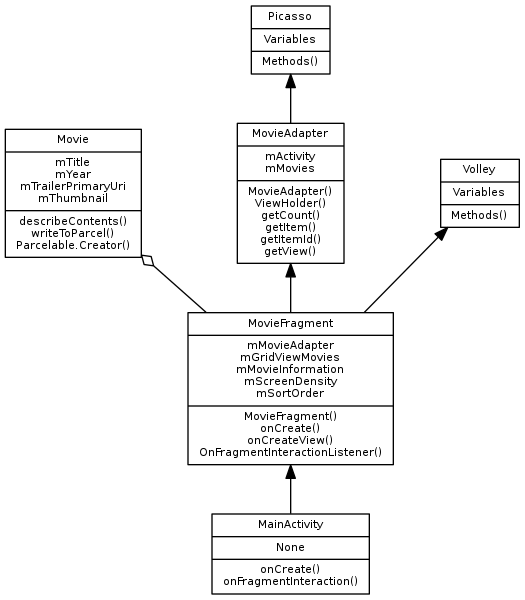
Quick Class Diagram
As someone who likes to write computer programs (and as a visual person), I do like to have a nice diagram accompany my programs, as per the example below:
Graphviz
sudo apt-get update
sudo apt-get install graphviz1 # User class
2 User
3
4 # User members
5 nick
6 numberCompleted
7 email
8 permission
9
10 # User methods
11 recordPassword()
12
13 Forum
14 # Forum members4546384823500609
15 number
16
17 # Forum methods
18 ForumPrivate
19 accessPermission
20
21 Message
22 # Message members
23 title
24
25 # Relationships
26 1 User * messages
27 1 forum has many messages1 # Relationships
2 User -> messages
3 forum -> messages
4 User -> Telephone
5 Telephone <- User